Finally getting to use Postgres 9.0. This very simple feature alone makes me want to cry tears of joy. :)
GRANT SELECT ON ALL TABLES IN SCHEMA public TO toto;
(You can replace "TABLES" with "FUNCTIONS" or "SEQUENCES", and of course the inverse, REVOKE, is available.)
Tuesday, March 15, 2011
Monday, March 07, 2011
Brief chat with a buddy about MySQL index size limitation
(2:44:19 PM) Buddy: so many hacks in mysql :) like, you can't use functions as a default value for a column unless that function is called CURRENT_TIMESTAMP which is a single exception
(2:44:59 PM) Me: ug :)
(2:45:59 PM) Buddy: index lengths are a major limit..I've been creating columns with the value of unhex(sha1(value)) and creating my unique indexes on that
(2:46:57 PM) Me: what's that expression?
(2:47:11 PM) Me: i think i have an idea... :)
(2:47:19 PM) Buddy: returns a 20 byte binary sha1 hash
(2:47:25 PM) Me: yeah..bleh :)
(2:48:59 PM) Me: i guess that's just for enforcing the uniqueness? Or would you look up by that too? (thus you have to remember to call unhex(...)) :)
(2:49:33 PM) Buddy: if I wanted to lookup using that index, then it would be lookup too
(2:49:47 PM) Me: yeah
(2:49:59 PM) Buddy: so my queries are like select value from table where valuesha1=unhex(sha1(thingIwant));
(2:50:14 PM) Me: bleh :)
(2:54:09 PM) Buddy: as long as your index is less then 767 bytes yer ok :)
(2:54:32 PM) Me: what are you indexing on that's bigger? you might have told me before...
(2:54:57 PM) Buddy: URLs :)
(2:55:00 PM) Me: ahh
(2:44:59 PM) Me: ug :)
(2:45:59 PM) Buddy: index lengths are a major limit..I've been creating columns with the value of unhex(sha1(value)) and creating my unique indexes on that
(2:46:57 PM) Me: what's that expression?
(2:47:11 PM) Me: i think i have an idea... :)
(2:47:19 PM) Buddy: returns a 20 byte binary sha1 hash
(2:47:25 PM) Me: yeah..bleh :)
(2:48:59 PM) Me: i guess that's just for enforcing the uniqueness? Or would you look up by that too? (thus you have to remember to call unhex(...)) :)
(2:49:33 PM) Buddy: if I wanted to lookup using that index, then it would be lookup too
(2:49:47 PM) Me: yeah
(2:49:59 PM) Buddy: so my queries are like select value from table where valuesha1=unhex(sha1(thingIwant));
(2:50:14 PM) Me: bleh :)
(2:54:09 PM) Buddy: as long as your index is less then 767 bytes yer ok :)
(2:54:32 PM) Me: what are you indexing on that's bigger? you might have told me before...
(2:54:57 PM) Buddy: URLs :)
(2:55:00 PM) Me: ahh
Tuesday, February 22, 2011
:eye roll:
Oracle Universal Installer can't be run in a directory with spaces in the name (Unix), or else it bombs! This is apparently due to lack of quotes in the runInstaller script, where a local variable is being set to pwd.
Friday, February 11, 2011
Get a database working...NOW
Problem: "I need an Oracle 11g database NOW and I think there's one at [hostname spit] but it doesn't work!"
Solution: Well as I didn't know of any others I jumped onto spit. First I checked if an Oracle instance was running:
Apparently not. OK, so are any databases installed?
Yes, two SIDs; orcl and spitfire. OK let's see if we can get into sqlplus to get one of them started.
Doh! Apparently there's no $ORACLE_HOME set…Therefore $ORACLE_SID is probably not set as well:
Well, let's set them.
Next, I checked whether the listener was running, and when I found it wasn't I started it:
And finally let's start up the EM DB Control:
At any rate, my coworker who needed this database ASAP gave me the thumbs up...w00t! But, will all these components start up automagically upon reboot? Stay tuned...
Solution: Well as I didn't know of any others I jumped onto spit. First I checked if an Oracle instance was running:
oracle@spit:~$ ps -ef | grep pmon
oracle 17973 17946 0 10:55 pts/4 00:00:00 grep --color=auto pmon
Apparently not. OK, so are any databases installed?
oracle@spit:~$ tail -n 5 /etc/oratab
# Multiple entries with the same $ORACLE_SID are not allowed.
#
#
orcl:/opt/oracle/product/11.2.0/dbhome_1:N
spitfire:/opt/oracle/product/11.2.0/dbhome_1:N
Yes, two SIDs; orcl and spitfire. OK let's see if we can get into sqlplus to get one of them started.
oracle@spit:~$ /opt/oracle/product/11.2.0/dbhome_1/bin/sqlplus
Error 6 initializing SQL*Plus
SP2-0667: Message file sp1.msb not found
SP2-0750: You may need to set ORACLE_HOME to your Oracle software directory
Doh! Apparently there's no $ORACLE_HOME set…Therefore $ORACLE_SID is probably not set as well:
oracle@spit:~$ echo $ORACLE_HOME
oracle@spit:~$ echo $ORACLE_SID
Well, let's set them.
oracle@spit:~$ export ORACLE_HOME=/opt/oracle/product/11.2.0/dbhome_1
oracle@spit:~$ export ORACLE_SID=orcl
Next, I checked whether the listener was running, and when I found it wasn't I started it:
oracle@spit:/opt/oracle/product/11.2.0/dbhome_1$ ./bin/lsnrctl startNow let's start up the instance!
LSNRCTL for Linux: Version 11.2.0.1.0 - Production on 11-FEB-2011 11:13:03
Copyright (c) 1991, 2009, Oracle. All rights reserved.
Starting /opt/oracle/product/11.2.0/dbhome_1/bin/tnslsnr: please wait...
TNSLSNR for Linux: Version 11.2.0.1.0 - Production
System parameter file is /opt/oracle/product/11.2.0/dbhome_1/network/admin/listener.ora
Log messages written to /opt/oracle/diag/tnslsnr/spot/listener/alert/log.xml
Listening on: (DESCRIPTION=(ADDRESS=(PROTOCOL=ipc)(KEY=EXTPROC1521)))
Listening on: (DESCRIPTION=(ADDRESS=(PROTOCOL=tcp)(HOST=spot)(PORT=1521)))
Connecting to (DESCRIPTION=(ADDRESS=(PROTOCOL=IPC)(KEY=EXTPROC1521)))
STATUS of the LISTENER
------------------------
Alias LISTENER
Version TNSLSNR for Linux: Version 11.2.0.1.0 - Production
Start Date 11-FEB-2011 11:13:05
Uptime 0 days 0 hr. 0 min. 0 sec
Trace Level off
Security ON: Local OS Authentication
SNMP OFF
Listener Parameter File /opt/oracle/product/11.2.0/dbhome_1/network/admin/listener.ora
Listener Log File /opt/oracle/diag/tnslsnr/spot/listener/alert/log.xml
Listening Endpoints Summary...
(DESCRIPTION=(ADDRESS=(PROTOCOL=ipc)(KEY=EXTPROC1521)))
(DESCRIPTION=(ADDRESS=(PROTOCOL=tcp)(HOST=spot)(PORT=1521)))
The listener supports no services
The command completed successfully
oracle@spit:/opt/oracle/product/11.2.0/dbhome_1$ sqlplus sys/******* as sysdbaAs a side note, I had set $ORACLE_SID to the wrong value earlier. It's going to look up the spfile's name by this sid, so if it's wrong the file will not be found (here I had set it to "oracl" instead of "orcl":
SQL*Plus: Release 11.2.0.1.0 Production on Fri Feb 11 11:27:30 2011
Copyright (c) 1982, 2009, Oracle. All rights reserved.
Connected to an idle instance.
SQL> startup
ORACLE instance started.
Total System Global Area 1690705920 bytes
Fixed Size 1336960 bytes
Variable Size 1291848064 bytes
Database Buffers 385875968 bytes
Redo Buffers 11644928 bytes
Database mounted.
Database opened.
SQL> quit;
Disconnected from Oracle Database 11g Enterprise Edition Release 11.2.0.1.0 - Production
With the Partitioning, OLAP, Data Mining and Real Application Testing options
SQL> startupLet's check out if the instance is picked up by the listener…
ORA-01078: failure in processing system parameters
LRM-00109: could not open parameter file '/opt/oracle/product/11.2.0/dbhome_1/dbs/initoracl.ora'
oracle@spit:/opt/oracle/product/11.2.0/dbhome_1$ lsnrctl status
LSNRCTL for Linux: Version 11.2.0.1.0 - Production on 11-FEB-2011 11:29:14
Copyright (c) 1991, 2009, Oracle. All rights reserved.
Connecting to (DESCRIPTION=(ADDRESS=(PROTOCOL=IPC)(KEY=EXTPROC1521)))
STATUS of the LISTENER
------------------------
Alias LISTENER
Version TNSLSNR for Linux: Version 11.2.0.1.0 - Production
Start Date 11-FEB-2011 11:13:05
Uptime 0 days 0 hr. 16 min. 9 sec
Trace Level off
Security ON: Local OS Authentication
SNMP OFF
Listener Parameter File /opt/oracle/product/11.2.0/dbhome_1/network/admin/listener.ora
Listener Log File /opt/oracle/diag/tnslsnr/spot/listener/alert/log.xml
Listening Endpoints Summary...
(DESCRIPTION=(ADDRESS=(PROTOCOL=ipc)(KEY=EXTPROC1521)))
(DESCRIPTION=(ADDRESS=(PROTOCOL=tcp)(HOST=spot)(PORT=1521)))
Services Summary...
Service "orcl" has 1 instance(s).
Instance "orcl", status READY, has 1 handler(s) for this service...
Service "orclXDB" has 1 instance(s).
Instance "orcl", status READY, has 1 handler(s) for this service...
The command completed successfully
And finally let's start up the EM DB Control:
oracle@spit:/opt/oracle/product/11.2.0/dbhome_1$ emctl start dbconsole(Note that "ulimit 25: bad number" wackiness. Some info on that here: http://johanlouwers.blogspot.com/2010/04/emctl-ulimit-25-bad-number.html)
ulimit: 25: bad number
Oracle Enterprise Manager 11g Database Control Release 11.2.0.1.0
Copyright (c) 1996, 2009 Oracle Corporation. All rights reserved.
https://spot:1158/em/console/aboutApplication
Starting Oracle Enterprise Manager 11g Database Control ............. started.
At any rate, my coworker who needed this database ASAP gave me the thumbs up...w00t! But, will all these components start up automagically upon reboot? Stay tuned...
Wednesday, January 19, 2011
Once again...
Once again I'm thwarted slowed down by a database limitation that, to me, seems silly and arbitrary.
4000 character limit in SSIS
4000 character limit in SSIS
Friday, January 14, 2011
Disabling/enabling indexes (Oracle)
I whipped up the following two procedures for disabling and enabling all indexes on a specified table. They do not handle every kind of index just yet. Technically it is marking indexes as unusable then rebuilding them. Unique/Primary Key indexes are not disabled/enabled in these functions. There may be a few other types of indexes not yet supported.
SQL Developer made the caps wacky - need to find the setting. :)
create or replace procedure DISABLE_INDEXES_ON_TABLE(P_OWNER_NAME in varchar2, P_TABLE_NAME in varchar2) as
DISABLE_STR long;
begin
for REC in (select * from ALL_INDEXES where OWNER=P_OWNER_NAME and TABLE_NAME=P_TABLE_NAME and UNIQUENESS='NONUNIQUE') LOOP
if REC.INDEX_TYPE in ('NORMAL', 'NORMAL/REV', 'FUNCTION-BASED DOMAIN', 'FUNCTION-BASED NORMAL') then
DISABLE_STR := 'ALTER INDEX ' || REC.INDEX_NAME || ' UNUSABLE';
end if;
execute immediate DISABLE_STR;
end loop;
end;
create or replace procedure ENABLE_INDEXES_ON_TABLE(P_OWNER_NAME in varchar2, P_TABLE_NAME in varchar2) as
REBUILD_STR long;
begin
for REC in (select * from ALL_INDEXES where OWNER=P_OWNER_NAME and TABLE_NAME=P_TABLE_NAME and UNIQUENESS='NONUNIQUE') LOOP
if REC.INDEX_TYPE in ('NORMAL', 'NORMAL/REV', 'FUNCTION-BASED DOMAIN', 'FUNCTION-BASED NORMAL') then
REBUILD_STR := 'ALTER INDEX ' || REC.INDEX_NAME || ' REBUILD';
end if;
execute immediate REBUILD_STR;
end LOOP;
end;
SQL Developer made the caps wacky - need to find the setting. :)
create or replace procedure DISABLE_INDEXES_ON_TABLE(P_OWNER_NAME in varchar2, P_TABLE_NAME in varchar2) as
DISABLE_STR long;
begin
for REC in (select * from ALL_INDEXES where OWNER=P_OWNER_NAME and TABLE_NAME=P_TABLE_NAME and UNIQUENESS='NONUNIQUE') LOOP
if REC.INDEX_TYPE in ('NORMAL', 'NORMAL/REV', 'FUNCTION-BASED DOMAIN', 'FUNCTION-BASED NORMAL') then
DISABLE_STR := 'ALTER INDEX ' || REC.INDEX_NAME || ' UNUSABLE';
end if;
execute immediate DISABLE_STR;
end loop;
end;
create or replace procedure ENABLE_INDEXES_ON_TABLE(P_OWNER_NAME in varchar2, P_TABLE_NAME in varchar2) as
REBUILD_STR long;
begin
for REC in (select * from ALL_INDEXES where OWNER=P_OWNER_NAME and TABLE_NAME=P_TABLE_NAME and UNIQUENESS='NONUNIQUE') LOOP
if REC.INDEX_TYPE in ('NORMAL', 'NORMAL/REV', 'FUNCTION-BASED DOMAIN', 'FUNCTION-BASED NORMAL') then
REBUILD_STR := 'ALTER INDEX ' || REC.INDEX_NAME || ' REBUILD';
end if;
execute immediate REBUILD_STR;
end LOOP;
end;
Monday, December 06, 2010
Some useful SQL Server links (for me)
As a fairly well experienced database developer who's new to MS SQL Server, here are some links that have been useful to me so far:
SQLTeam.com: Introduction to Dynamic SQL Part 1
SQLTeam.com: Introduction to Dynamic SQL Part 2 - here sp_executesql is what I was really looking for, as it lets you execute dynamic SQL with bound parameters
Transact-SQL Data types reference (MS)
Translating from Oracle to SQL Server
SQL Server Stored Procedure Basics
SQLTeam.com: Introduction to Dynamic SQL Part 1
SQLTeam.com: Introduction to Dynamic SQL Part 2 - here sp_executesql is what I was really looking for, as it lets you execute dynamic SQL with bound parameters
Transact-SQL Data types reference (MS)
Translating from Oracle to SQL Server
SQL Server Stored Procedure Basics
Friday, November 05, 2010
The GO command in SQL Server is funny
Well I'm doing serious work in MS SQL Server for the first time, and I'm learning by doing, understanding its quirks as I go. The GO command, which seems analogous to / in Oracle's SQL*Plus, can be confusing!
http://www.sql-server-performance.com/articles/dba/go_command_p1.aspx
http://www.sql-server-performance.com/articles/dba/go_command_p1.aspx
Friday, October 15, 2010
A classic database-related cartoon
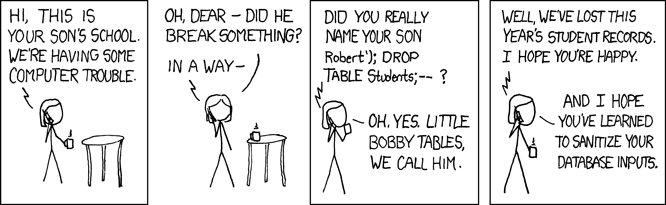
OK maybe that doesn't hold true for ALL databases (I don't know one way or the other). Definitely true with Oracle though.
Remember kids (Oracle, redo logging)...
Borrowed from AskTom (and slightly cleaned up):
Table Mode Insert Mode ArchiveLog Mode Result
---------- ----------- --------------- ------
LOGGING APPEND ARCHIVELOG redo generated
NOLOGGING APPEND ARCHIVELOG no redo
LOGGING no append ARCHIVELOG redo generated
NOLOGGING no append ARCHIVELOG redo generated
LOGGING APPEND NOARCHIVELOG no redo
NOLOGGING APPEND NOARCHIVELOG no redo
LOGGING no append NOARCHIVELOG redo generated
NOLOGGING no append NOARCHIVELOG redo generated
Table Mode Insert Mode ArchiveLog Mode Result
---------- ----------- --------------- ------
LOGGING APPEND ARCHIVELOG redo generated
NOLOGGING APPEND ARCHIVELOG no redo
LOGGING no append ARCHIVELOG redo generated
NOLOGGING no append ARCHIVELOG redo generated
LOGGING APPEND NOARCHIVELOG no redo
NOLOGGING APPEND NOARCHIVELOG no redo
LOGGING no append NOARCHIVELOG redo generated
NOLOGGING no append NOARCHIVELOG redo generated
Sunday, August 22, 2010
Thursday, June 10, 2010
Why Join Removal Is Cool
Article by Robert Haas about a, well, cool new Postgresql 9.0 feature - http://rhaas.blogspot.com/2010/06/why-join-removal-is-cool.html
Saturday, March 06, 2010
Partitioned Aggregates ...or... I love "Distinct On"
Let's begin by creating a table dealing with loan data:
postgres=# create table loan (id serial primary key, type varchar(1), issue_date date, issue_amount numeric);
NOTICE: CREATE TABLE will create implicit sequence "loan_id_seq" for serial column "loan.id"
NOTICE: CREATE TABLE / PRIMARY KEY will create implicit index "loan_pkey" for table "loan"
CREATE TABLE
Create some test data in an appropriately-named file, testdata:
A|20090405|10000
A|20100101|50000
A|20070605|40000
B|19850815|100000
B|19900430|10000
C|20100304|5555
D|20011122|512591
D|20080517|250259
D|20100206|22222
D|20100204|99999
Load it up...
postgres=# \copy loan (type, issue_date, issue_amount) from 'testdata' delimiter '|'
postgres=# select * from loan;
id | type | issue_date | issue_amount
----+------+------------+--------------
1 | A | 2009-04-05 | 10000
2 | A | 2010-01-01 | 50000
3 | A | 2007-06-05 | 40000
4 | B | 1985-08-15 | 100000
5 | B | 1990-04-30 | 10000
6 | C | 2010-03-04 | 5555
7 | D | 2001-11-22 | 512591
8 | D | 2008-05-17 | 250259
9 | D | 2010-02-06 | 22222
10 | D | 2010-02-04 | 99999
(10 rows)
Now, here's a fairly common query I have to run. I'd like to get the most recent loan per type. That is, I want to tell postgres: For each type value (A,B,C,D), get me the row with the greatest issue_date.
How to do this? We obviously need to use max(issue_date) somewhere. The rest is a little bit more esoteric.
We're going to solve this problem using the unique-to-postgres DISTINCT ON feature. DISTINCT ON (col) gives you one row for each value of col. For example:
postgres=# select distinct on (type) * from loan;
id | type | issue_date | issue_amount
----+------+------------+--------------
1 | A | 2009-04-05 | 10000
4 | B | 1985-08-15 | 100000
6 | C | 2010-03-04 | 5555
7 | D | 2001-11-22 | 512591
(4 rows)
Ta-da! But wait, these aren't the most recent rows per type. An immediately obvious problem is that for type A, the row with id=2 should be returned. Postgres thought: For each type, return the first row I see. How do we get it to return the most recent only?
The answer lies in the good ol' ORDER BY clause. If we sort appropriately, the first row Postgres sees of each type will be the most recent:
postgres=# select distinct on (type) * from loan order by type, issue_date desc;
id | type | issue_date | issue_amount
----+------+------------+--------------
2 | A | 2010-01-01 | 50000
5 | B | 1990-04-30 | 10000
6 | C | 2010-03-04 | 5555
9 | D | 2010-02-06 | 22222
(4 rows)
Now I can really say Ta-da... This was something that was not very intuitive to me, but has proved very useful to know.
How would I solve this problem using Oracle? I would probably use a so-called Analytic query. Like most things Oracle, this feature is powerful but complex. It's more applicable to a wider set of problems, but for this specific problem it seems a little bit complicated.
Unfortunately I don't have an Oracle install handy at the moment, but it should be something like this:
select *
from (select id, type, issue_date, issue_amount,
row_number() over (partition by type order by issue_date desc) rn
from loan)
where rn = 1;
What we're doing above is telling Oracle to make a row number for each row in the table, partitioned by type. Conceptually it's doing something like this:
id|type|...|row_number
--+----+---+----------
1 |A |...|1
2 |A |...|2
3 |A |...|3
4 |B |...|1
5 |B |...|2
6 |C |...|1
7 |D |...|1
8 |D |...|2
9 |D |...|3
10|D |...|4
So above we see a row number assigned to each row, where the row number is reset to 1 for each type.
There is more to it. In the PARTITION BY clause we also have "order by issue_date desc" - this means for each type, row_number 1 is assigned to the row with the greatest issue_date. If we treat this whole query as a subquery, we can simply select * from it where row_number=1. The resultset should be the same as with Postgresql's DISTINCT ON:
id | type | issue_date | issue_amount
----+------+------------+--------------
2 | A | 2010-01-01 | 50000
5 | B | 1990-04-30 | 10000
6 | C | 2010-03-04 | 5555
9 | D | 2010-02-06 | 22222
(4 rows)
postgres=# create table loan (id serial primary key, type varchar(1), issue_date date, issue_amount numeric);
NOTICE: CREATE TABLE will create implicit sequence "loan_id_seq" for serial column "loan.id"
NOTICE: CREATE TABLE / PRIMARY KEY will create implicit index "loan_pkey" for table "loan"
CREATE TABLE
Create some test data in an appropriately-named file, testdata:
A|20090405|10000
A|20100101|50000
A|20070605|40000
B|19850815|100000
B|19900430|10000
C|20100304|5555
D|20011122|512591
D|20080517|250259
D|20100206|22222
D|20100204|99999
Load it up...
postgres=# \copy loan (type, issue_date, issue_amount) from 'testdata' delimiter '|'
postgres=# select * from loan;
id | type | issue_date | issue_amount
----+------+------------+--------------
1 | A | 2009-04-05 | 10000
2 | A | 2010-01-01 | 50000
3 | A | 2007-06-05 | 40000
4 | B | 1985-08-15 | 100000
5 | B | 1990-04-30 | 10000
6 | C | 2010-03-04 | 5555
7 | D | 2001-11-22 | 512591
8 | D | 2008-05-17 | 250259
9 | D | 2010-02-06 | 22222
10 | D | 2010-02-04 | 99999
(10 rows)
Now, here's a fairly common query I have to run. I'd like to get the most recent loan per type. That is, I want to tell postgres: For each type value (A,B,C,D), get me the row with the greatest issue_date.
How to do this? We obviously need to use max(issue_date) somewhere. The rest is a little bit more esoteric.
We're going to solve this problem using the unique-to-postgres DISTINCT ON feature. DISTINCT ON (col) gives you one row for each value of col. For example:
postgres=# select distinct on (type) * from loan;
id | type | issue_date | issue_amount
----+------+------------+--------------
1 | A | 2009-04-05 | 10000
4 | B | 1985-08-15 | 100000
6 | C | 2010-03-04 | 5555
7 | D | 2001-11-22 | 512591
(4 rows)
Ta-da! But wait, these aren't the most recent rows per type. An immediately obvious problem is that for type A, the row with id=2 should be returned. Postgres thought: For each type, return the first row I see. How do we get it to return the most recent only?
The answer lies in the good ol' ORDER BY clause. If we sort appropriately, the first row Postgres sees of each type will be the most recent:
postgres=# select distinct on (type) * from loan order by type, issue_date desc;
id | type | issue_date | issue_amount
----+------+------------+--------------
2 | A | 2010-01-01 | 50000
5 | B | 1990-04-30 | 10000
6 | C | 2010-03-04 | 5555
9 | D | 2010-02-06 | 22222
(4 rows)
Now I can really say Ta-da... This was something that was not very intuitive to me, but has proved very useful to know.
How would I solve this problem using Oracle? I would probably use a so-called Analytic query. Like most things Oracle, this feature is powerful but complex. It's more applicable to a wider set of problems, but for this specific problem it seems a little bit complicated.
Unfortunately I don't have an Oracle install handy at the moment, but it should be something like this:
select *
from (select id, type, issue_date, issue_amount,
row_number() over (partition by type order by issue_date desc) rn
from loan)
where rn = 1;
What we're doing above is telling Oracle to make a row number for each row in the table, partitioned by type. Conceptually it's doing something like this:
id|type|...|row_number
--+----+---+----------
1 |A |...|1
2 |A |...|2
3 |A |...|3
4 |B |...|1
5 |B |...|2
6 |C |...|1
7 |D |...|1
8 |D |...|2
9 |D |...|3
10|D |...|4
So above we see a row number assigned to each row, where the row number is reset to 1 for each type.
There is more to it. In the PARTITION BY clause we also have "order by issue_date desc" - this means for each type, row_number 1 is assigned to the row with the greatest issue_date. If we treat this whole query as a subquery, we can simply select * from it where row_number=1. The resultset should be the same as with Postgresql's DISTINCT ON:
id | type | issue_date | issue_amount
----+------+------------+--------------
2 | A | 2010-01-01 | 50000
5 | B | 1990-04-30 | 10000
6 | C | 2010-03-04 | 5555
9 | D | 2010-02-06 | 22222
(4 rows)
Subscribe to:
Posts (Atom)