Showing posts with label SQL. Show all posts

Saturday, July 19, 2025

Playing SQL Mythbuster - or - I really ought to lay off the SQL on social media

Often, when I visit SQL-related forums and social media, I encounter posts that are half-truths, overgeneralizations, and sometimes, outright myths. This is especially true on the subject of SQL performance. 

The problem is I can't just scroll past. I have this compulsion to play SQL Mythbuster. If the posts had, say, 2 likes and that's it, I'd probably move on. But they often have hundreds of positive reactions and comments in response to some dubious, unsupported, or at least badly qualified claims. 


For example, here's a recent LinkedIn post:


Here's why I'm not a fan of this post (no offense to the author):

  1. The proposed optimization is a magic performance trick. It is essentially saying, "Hey, instead of writing this straightforward query, you can rearrange it in this magic way to make it go fast!" The post doesn't attempt to justify the claim other than by unconvincingly stating that the more straightforward query (hereafter called Query 1) causes "poor index utilization," while the supposedly optimized query (hereafter called Query 2) presumably does not.

  2. The post doesn't even state which of the 100+ DBMSs* in the world he's running, each of which has unique performance characteristics. Always be skeptical of claims resembling, "In SQL, always do this thing to make it fast," without qualifying the claim with a specific DBMS. It is like saying, "In vehicles with an internal combustion engine, always do this to make them run fast." For starters, what kind of vehicle: car? truck? plane?

    It is worth mentioning, despite my skepticism, that it's quite possible this trick did work for some DBMS. But which one? Tell us! My intuition tells me there's no way the claim is universally true, but it could be accurate for some specific version of some specific DBMS (in a specific schema, specific data set, specific configuration, etc.) The problem I have is that it's presented as if the trick applies to all of "SQL." (Whatever that is; SQL doesn't exist in a vacuum, remember!) To be fair, it didn't explicitly say "all of SQL," but IMHO, it is implied.

    Also worth mentioning, a commenter asked which DBMS, but the original poster didn't reply.

    *I am using "DBMS" as a generic, catch-all term of choice to refer to a relational DBMS or any other SQL engine

  3. There is no evidence presented to convince the reader that Query 2 is faster: no timing data; no execution plans. There is no demonstration of the "poor index utilization" of Query 1. The poster just said it's real and left it at that. 🤷 One commenter did ask to see some evidence, and the poster pushed back. 🤷🤷

  4. Although we can make some reasonable assumptions - e.g. id is probably the sole primary key column, and it's an integer type - nothing is mentioned about the table definition, number of rows, width of the rows, the table's physical structure (i.e. is it a clustered index?) Does it have indexes? And so on.
     
  5.  The final, and perhaps most important, reason I'm not a fan of the post is this:

    Great (/s) - so 926 reactions, most of which are positive. In other words, a lot of folks accepting this performance trick as factual. Also notice the 51 reposts. Way to spread yet another new myth. 🤦🏻‍♂️

That said, is it actually a myth? Could it be possible that despite being not the best-written post, Query 2 does actually run faster than Query 1 on some DBMSs?

When in doubt, test it out!

But here's the thing - I can't test it on all 100+ SQL DBMSs in the world. Who can? (Maybe somebody with a really cool test suite set up?) What I can do is test it on a recent version of an extremely popular DBMS.

Below is a test case on MySQL 8.0, using reasonable assumptions, that demonstrates Query 2 is not faster, so it disproves the claim...at least for my specific test in MySQL 8.0. The test below, of course, does not prove anything about Oracle or Snowflake, or Microsoft or any other DBMS.

But all it really takes to disprove a universal claim is a single counterexample, and MySQL 8.0 isn't exactly an obscure DBMS. So I consider the claim to be a myth. ("BUSTED," if you want. :)) 

I should put my money where my mouth is and show my tests. So, here they are! 

MySQL 8.0 Tests: 

mysql> /* setup */
mysql> CREATE TABLE users (id INT AUTO_INCREMENT PRIMARY KEY, name VARCHAR(100), salary INT);
Query OK, 0 rows affected (0.01 sec)


mysql> /* generate 10 million dummy rows */
mysql> INSERT INTO users (name, salary)
    -> SELECT RAND(), RAND()*10000 FROM information_schema.columns c1, information_schema.columns c2, information_schema.columns c3
    -> LIMIT 10000000;
Query OK, 10000000 rows affected (1 min 39.74 sec)
Records: 10000000  Duplicates: 0  Warnings: 0

For the purpose of this demonstration, I am searching by 10,000 IDs, from a 10 million row table. If I search by a mere five IDs, both queries execute so fast that the MySQL CLI (my client) reports both as running in 0.00 seconds flat. So I needed to scale up the search to the point at which there can be a measurable difference.

Query 1:

mysql> EXPLAIN ANALYZE
    -> SELECT * FROM users WHERE id IN (9462823,6458594,3326348, <snip>); 

Query 1 Average Time to Execute (6 trials): 122 ms 

Show details
  • Trial 1: 200 ms
  • Trial 2: 160 ms
  • Trial 3: 140 ms
  • Trial 4: 80 ms
  • Trial 5: 90 ms
  • Trial 6: 60 ms
  • (MySQL cli used, which rounds to hundredths of a second)


Query 1 Sample Execution Plan:

-> Filter: (users.id in (9462823,6458594,3326348,<snip>))  (cost=10122 rows=9994) (actual time=0.0575..43.9 rows=10000 loops=1)
    -> Index range scan on users using PRIMARY over (id = 741) OR (id = 1245) OR (9998 more)  (cost=4502 rows=10000) (actual time=0.0525..41.9 rows=10000 loops=1)

 
Note MySQL used an index range scan on users using PRIMARY. that means it searched essentially for a whole batch of the id values using the primary index in one scan, which you can't really hope to do much better than. Absolutely not "poor index utilization."

Query 2:

mysql> WITH ids(id) AS (
    ->     /* should use row constructors IMO, but this is how OOP did it */
    ->     SELECT 9462823 UNION ALL
    ->     SELECT 6458594 UNION ALL
    ->     SELECT 3326348 UNION ALL
    ->     <snip>
    -> )
    -> SELECT u.*
    -> FROM users u
    -> JOIN ids ON u.id = ids.id;


Query 2 Average Time to Execute (6 trials run): 197 ms 

Show details
  • Trial 1: 240 ms
  • Trial 2: 230 ms
  • Trial 3: 220 ms
  • Trial 4: 200 ms
  • Trial 5: 150 ms
  • Trial 6: 140 ms
  • (MySQL cli used, which rounds to hundredths of a second)


Query 2 Sample Execution Plan:

-> Nested loop inner join  (cost=11516 rows=10000) (actual time=7.88..70.8 rows=9955 loops=1)
    -> Table scan on ids  (cost=2304..2432 rows=10000) (actual time=7.71..8.19 rows=10000 loops=1)
        -> Materialize union CTE ids  (cost=2304..2304 rows=10000) (actual time=7.71..7.71 rows=10000 loops=1)
            -> Rows fetched before execution  (cost=0..0 rows=1) (actual time=166e-6..208e-6 rows=1 loops=1)
            -> Rows fetched before execution  (cost=0..0 rows=1) (actual time=167e-6..209e-6 rows=1 loops=1)
            -> Rows fetched before execution  (cost=0..0 rows=1) (actual time=42e-6..84e-6 rows=1 loops=1)
            <snip>
(cost=0..0 rows=1) (actual time=0..41e-6 rows=1 loops=1)
    -> Filter: (u.id = ids.id)  (cost=0.25 rows=1) (actual time=0.00218..0.00226 rows=1 loops=10000)
        -> Single-row index lookup on u using PRIMARY (id = ids.id)  (cost=0.25 rows=1) (actual time=0.00207..0.0021 rows=1 loops=10000)

What this plan tells us in plain English:

  1. Materialize the CTE ids (basically think like making a temp table) based on all those UNION ALL'ed constants (each of those tiny UNION ALL statements is represented by "Rows fetched before execution")
  2. Table scan ids, and for each id, do a single-row index lookup on the primary index. Notice this is done in a Nested loop inner join. Essentially: for each id in ids, do a single-row index lookup on primary index.

Conclusion: 

All in all, Query 2 didn't perform badly (avg 197 ms), but definitely worse than Query 1 (avg 122 ms), a relative difference of about 38%, which is pretty significant. (I actually wonder if I replaced all those UNION ALLs in Query 2 with row constructors, could that help the performance? But I'm not going to explore that today.)

Aside from performance claims, the post also claims Query 2 provides:

  • "single query execution": sure it's one query, but so is Query 1. Huh???
  • Readability: subjective, but I'm not seeing it in this instance, and I say this as a CTE fanboy. (Query 2 uses a CTE, i.e. the WITH clause.)
  • Portability: Either of these queries should successfully parse and execute on pretty much any modern SQL engine, but if you came up to me and said "I know a SQL DBMS that can only handle one of these two queries -- which is it? Dollars to doughnuts it would be Query 1. (I think of how MySQL didn't even support CTEs until MySQL 8!)

OK, end of rant for today! But yeah, sometimes I need to stay away from SQL chatter on the internet. There's all kinds of this stuff that drives me crazy. 

Edit Weeks Later: Now Let's Test PostgreSQL 17.4! 

I thought I might enhance this post by repeating the same MySQL tests, but on Postgres 17.4 instead! See below.
 
postgres=# CREATE TABLE users (id INT GENERATED BY DEFAULT AS IDENTITY PRIMARY KEY, name VARCHAR(100), salary INT);
CREATE TABLE

postgres=# INSERT INTO users (name, salary)
postgres-# SELECT RANDOM(), RANDOM()*10000
postgres-# FROM generate_series(1, 10000000);
INSERT 0 10000000
Time: 38705.863 ms (00:38.706)
 

Query 1, Postgres:

postgres=# EXPLAIN ANALYZE
postgres-# SELECT * FROM users WHERE id IN (1322614, 8993900, 6548546, <snip>);
 

Query 1, Postgres, Average Time to Execute (6 trials): 103 ms 

Show details
  • Trial 1: 11.5 ms (planning) + 99.0 ms (execution) = 110.5 ms
  • Trial 2: 7.9 ms (planning) + 156.6 ms (execution) = 164.5 ms
  • Trial 3: 8.6 ms (planning) 60.7 ms (execution) = 69.3 ms
  • Trial 4: 11.1 ms (planning) 92.5 ms (execution) = 103.6 ms
  • Trial 5: 6.4 (planning) 70.4 ms (execution) = 76.8 ms
  • Trial 6: 11.6 (planning) 88.1 ms (execution) = 99.7 ms

Query 1, Postgres, Sample Execution Plan:

 Index Scan using users_pkey on users  (cost=0.43..35565.89 rows=10000 width=27) (actual time=3.200..88.645 rows=10000 loops=1)
   Index Cond: (id = ANY ('{1322614,8993900,6548546,3547394,9242769,4281742,4334656, <snip>}'::integer[]))

Query 2, Postgres:

postgres=# EXPLAIN ANALYZE
postgres-# WITH ids(id) AS (
postgres(#     SELECT 1322614 UNION ALL
postgres(#     SELECT 8993900 UNION ALL
postgres(#     SELECT 6548546 UNION ALL
postgres(# <snip>
postgres(# )
postgres-# SELECT u.*
postgres-# FROM users u
postgres-# JOIN ids ON u.id = ids.id;


Query 2, Postgres, Average Time to Execute  (6 trials): 415.5 ms 

Show details
  • Trial 1: 170.6 ms (planning) + 244.0 ms (execution) = 414.6 ms
  • Trial 2: 180.9 ms (planning) + 284.4 ms (execution) = 465.3 ms
  • Trial 3: 169.9 ms (planning) + 220.1 ms (execution) = 389.1 ms
  • Trial 4: 168.5 ms (planning) + 214.2 ms (execution) = 382.7 ms
  • Trial 5: 176.6 ms (planning) + 268.1 ms (execution) = 444.7 ms
  • Trial 6: 174.8 ms (planning) + 219.3 ms (execution) = 394.1 ms

Query 2, Postgres, Sample Execution Plan:

 Gather  (cost=1000.43..2057.59 rows=10000 width=27) (actual time=25.238..216.174 rows=10000 loops=1)
   Workers Planned: 2
   Workers Launched: 2
   ->  Nested Loop  (cost=0.43..57.59 rows=4167 width=27) (actual time=0.052..87.485 rows=3333 loops=3)
         ->  Parallel Append  (cost=0.00..50.00 rows=1 width=4) (actual time=0.002..3.282 rows=3333 loops=3)
               ->  Result  (cost=0.00..0.01 rows=1 width=4) (actual time=0.001..0.001 rows=1 loops=1)
               ->  Result  (cost=0.00..0.01 rows=1 width=4) (actual time=0.000..0.000 rows=1 loops=1)
               ->  Result  (cost=0.00..0.01 rows=1 width=4) (actual time=0.001..0.001 rows=1 loops=1)
               <snip>
         ->  Index Scan using users_pkey on users u  (cost=0.43..7.58 rows=1 width=27) (actual time=0.025..0.025 rows=1 loops=10000)
               Index Cond: (id = (1322614))


⚠️ On Postgres, my first attempt at running Query 2 failed because:

ERROR:  stack depth limit exceeded
HINT:  Increase the configuration parameter "max_stack_depth" (currently 2048kB), after ensuring the platform's stack depth limit is adequate.


This is an issue when stringing all those SELECTs of literals separated by UNION ALLs, which nobody should be doing in 2025 unless your DBMS of choice does not support row constructors (Postgres does). My workaround for the purposes of running these tests was to add this to the top of my script:

set max_stack_depth = '7664kB';
 
7664kB is the max allowed by Postgres, and it isn't that much larger than the default of 2048kB. I got lucky in this particular use case, but if that's the ceiling, the Query 2 approach appears to be much less scalable on Postgres.


Conclusion for Postgres: 

So in summary, this magic performance trick was also BUSTED on Postgres 17.4. Query 2 is actually much slower than Query 1 for this given test; it took almost exactly 4 times longer to run!
 
Notice the Postgres planner tried to use parallel processing for Query 2, which my Postgres instance is configured to cap at 2 workers at the moment. It's possible that if I tuned parallel query settings, it could do better than presented here. It's not impossible that it could beat Query 1 even, but I have to go with the results I have here. This is why "for this particular configuration" is important to qualify your tests with, in addition to DBMS/version/etc.
 
It may even be worth mentioning all the tests in this post were run on my 2021 M1 Macbook Pro. The results could vary if I ran it on another machine, or on some cloud database service such as Amazon RDS.


Overall Conclusion: 

The major point I'm trying to make here is not "they are wrong and I am right," but rather, it is important to communicate about SQL performance more carefully! Always, with respect to performance quirks, qualify a post with your DBMS of choice. Ideally, talk about version and more detail about the schema and data as well. 

If some performance trick - say approach A runs faster than approach B - on your specific database running on, say, Oracle 19c, your experience is valid. But absolutely do not take away from your experience a vast overgeneralization such as: "In SQL, you should always do A because it's faster than B." 
 
And: always show the proof that one approach was slower or faster than the other! Show the respective timings, and ideally, the respective execution plans. Don't just say it's true. Convince us with evidence!

Always be skeptical of these magic performance tricks you see on the internet. If they can't even specify a DBMS, do not believe them! At least not by default. Make them put up or shut up. :) If they present the full test case and it supports their claim, great! But even then, the test shouldn't be generalized to all of "SQL." Rather, the test demonstrates something about a specific data set in a specific schema on a specific version of a specific DBMS product with a specific configuration, etc.
 
Question to the readers: what do you guys think? Should I test the claim on more DBMSs? Am I being fair? Do the tests seem valid? Let me know what you think in the comments!


Wednesday, May 07, 2025

Standard SQL, Shmandard SQL

I find the concept of "Standard SQL" - referring to these magical ANSI/ISO/IEC/whatever documents that spec out how SQL is supposed to work - to be a fascinating subject. Lately I've been thinking about my personal observation that hardly anybody who works with SQL knows what's in "the standard" and what isn't.

I can't blame them, because these documents are not freely available to the world. Look below to see how much they cost to read on iso.org:


So unless you're a corporation with a big budget for this sort of thing, like Oracle or Snowflake, or perhaps a university, you're probably not going to justify purchasing those docs. I, as an individual SQL geek, have thought about purchasing these docs to read over, with the hopes of taking my SQL knowledge to a higher level, or at least to a place I haven't been able to explore before. That is, until I learned that I couldn't simply shell out ~$300 once and get it all. There are ABOUT A DOZEN docs at that price! And then I'd potentially have to buy all the incremental updates as well. So clearly they aren't intended for the curious individual to purchase.

There are, however, some third-party sources of information that do a good job of parsing out which syntaxes and features are and are not in standard SQL, and which iterations. Markus Winand's fantastic web site modern-sql.com comes to mind. Wikipedia isn't a bad reference either, just to get a high-level overview of which features are in which version of the standard (for example: https://en.wikipedia.org/wiki/SQL:1999)

But what I've noticed over the years is that many folks who work with SQL will meet a particular SQL engine's special feature with suspicion because it's non-standard. Or at least, it's not standard...in their opinion! In other words, they might say something like, "I don't want to use some vendor-specific oddity, because if I need to switch engines down the line, that will make life difficult."

My thoughts on this kind of remark are as follows:

1. There actually is no full implementation of standard SQL!

Here is a brilliantly simple exchange on X (formerly Twitter) that I saw a few years ago: 


Lukas Eder, who made the one-word reply, is the creator of the SQL framework for JVM-based languages called jOOQ. jOOQ's list of supported DBMSs can be found here. I mention that list because if someone who has painstakingly dealt with the ins and outs of SQL syntax between ALL those different dialects can confidently state that NONE of the implementations is complete, we should probably take his word for it.

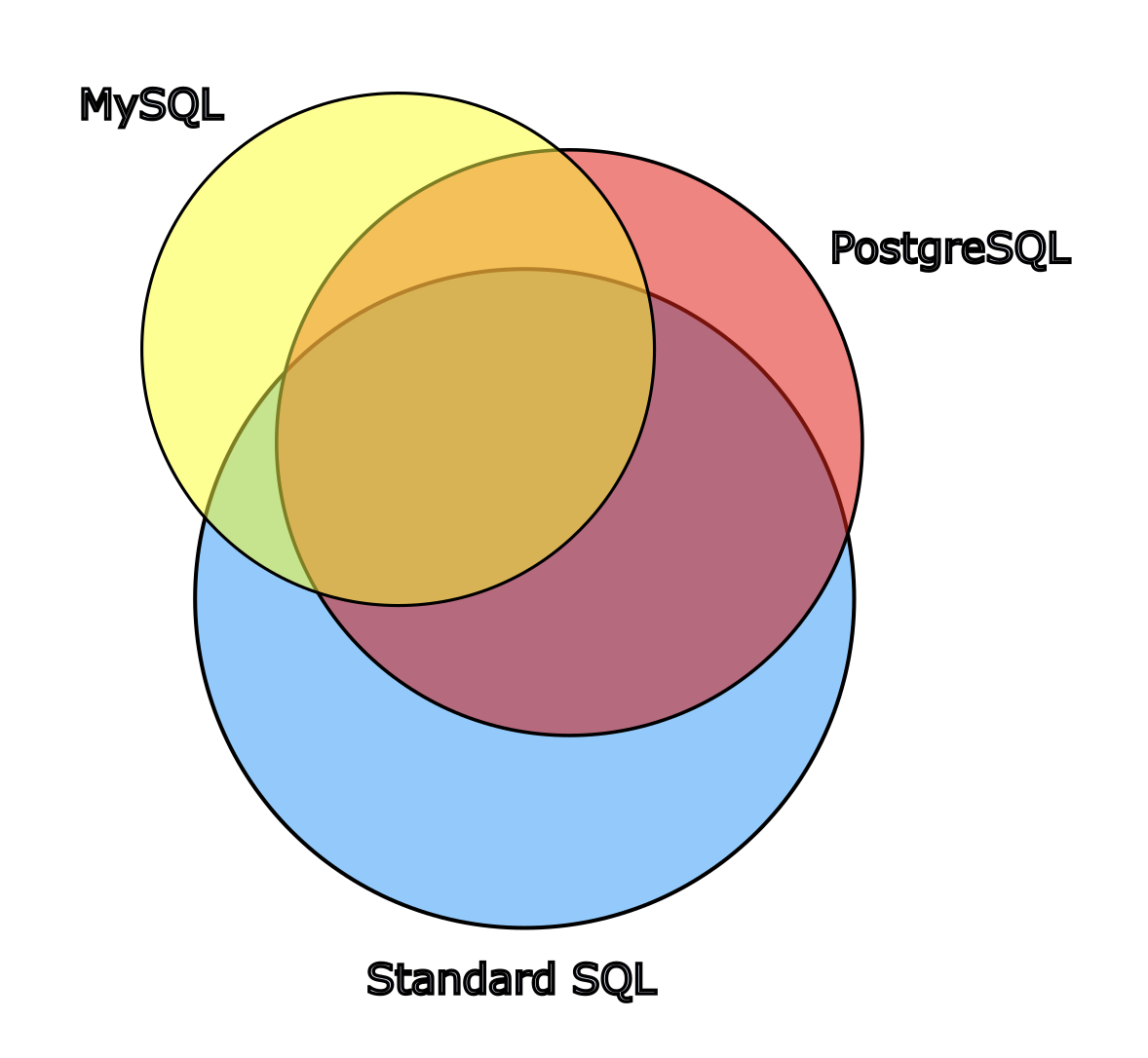
Additionally, loosely speaking, pretty much all the implementations add their own inventions. And consider that for any given standard SQL feature, it may or may not exist in both SQL Engine ABC and SQL Engine XYZ. The overlap with standard SQL tends to be much looser than many people realize. So if I were to draw a Venn diagram to depict standard SQL and various implementations thereof, in which area on the diagram represents features and syntaxes, it might look something like the following (I'm constraining myself to only standard, Postgres and MySQL for simplicity's sake):


  1.  

Disclaimer: the above diagram is not to scale in any meaningful way; nor did I attempt to take on the Herculean task of methodically evaluating feature sets in a technically accurate manner and sizing these circles accordingly. In other words this diagram isn't "real"; I just made it to illustrate how I personally conceptualize the fact that all implementations partially and loosely overlap with standard SQL as well as each other! 

So with the above diagram in mind, say you're using Postgres. If you limit yourself to the Postgres features that overlap with standard SQL only, you're omitting a large chunk of what Postgres has to offer!

2. In my experience, switching between SQL engines is a rare event.

If you do have a need to interact with multiple engines as a requirement, you would probably want a tool to handle the SQL conversions, or generation, for you anyway, perhaps jOOQ, just to name one. If you don't have that requirement and you prefer writing SQL by hand, and the rare need to pivot from one DBMS to another does occur, then you would need a concerted effort to convert queries anyway (involving lots of testing).

3. Much of the time, in my experience, these claims of "that thing is not standard SQL" are just plain wrong!

I recently saw a post on LinkedIn, in which a poster was excited to share his recently acquired knowledge about the handy IS DISTINCT FROM syntax in Snowflake. Another user chimed in to say he didn't like that syntax, because it's non-standard. And yet here it is, being all standardy: https://modern-sql.com/caniuse/is-distinct-from.


I've seen this same kind of remark many, many times in SQL discussions over the years! It feels like many folks come up with a "pseudo-standard" model of what they think is standard in their head, based on which features and syntaxes they commonly see. They don't actually do their due diligence in determining what is and what isn't part of standard SQL, which again, I can't blame them too much for, since this is hard to do. (I've made this very error myself, even.) Instead, if they haven't seen some particular syntax too often, or it isn't widespread, they assume it is not standard SQL. Which brings me to my next point...

4. They are probably already using non-standard SQL features all the time anyway!

But before I elaborate on this point...

RANDOM POP QUIZ TIME:

Your query is returning a million rows, but you only want the first 10 rows to be returned. With which syntax can you modify your query to accomplish this, if you want to conform to standard SQL syntax only?

A) FETCH FIRST 10 ROWS ONLY
B) LIMIT 10
C) TOP 10
D) ROWNUM <= 10

I asked this question on my company's Slack server, and B) LIMIT 10, was the most popular response by far. But that's incorrect! LIMIT is common for SQL engines to support - MySQL supports it, as does Postgres and many others - but it is NOT mentioned in any of those crazy ANSI/ISO/etc. standard SQL docs! The correct answer is actually A) FETCH FIRST 10 ROWS ONLY

It just goes to show how obscure it is to know which syntax and features are part of standard SQL and which are not.

A few more examples of non-standard but common syntax:

  • identifier quoting using backticks (e.g. `my_table`)
  • identifier quoting using brackets (e.g. [my_table])
  • string literal quoting with double quotes  (e.g. WHERE NAME = "Mark")
  • commonly used functions like DATEDIFF() and NOW()
  • AUTO_INCREMENT (e.g. creating a column defined as ID INT AUTO_INCREMENT PRIMARY KEY) and SERIAL (the older way to accomplish this in Postgres)
  • OFFSET (e.g. OFFSET 1000 LIMIT 10) 
  • CREATE MATERIALIZED VIEW (materialized views are not part of standard SQL)

 5. "Standard" doesn't necessary mean "common" or "widespread."

Sometimes nonstandard syntaxes/features do have widespread adoption. Again, see LIMIT. So there's almost an "not truly standard but commonplace" set of syntaxes/features. Another example: I've been seeing the useful QUALIFY syntax more and more lately, particularly in analytic SQL engines, which has to do with filtering results of window functions more elegantly. Snowflake, BigQuery, Redshift and several others support QUALIFY. But is it standard? Nope!

6. Two implementations of one standard feature could have very different under-the-hood workings or options.

For some statements, such as CREATE INDEX, the basic syntax is standard but the options available to the statement may vary quite a bit per implementation. And those options drive what goes under the hood of the engine, which can be very different. Consider that Postgres features binary range (brin) indexes, but MySQL does not. So how do we even account for this fact in the above Venn diagram? Is it a three-way intersection (MySQL + Postgres + Standard SQL all include CREATE INDEX)? Is it a partial overlap? It's complicated.

In the case of CREATE MATERIALIZED VIEW, both Oracle and Postgres have this statement and the kind of database object, a materialized view, that can be created and used. But an Oracle Materialized View is much more robust and powerful than a Postgres materialized view (see this past post of mine for reference). MySQL does not have materialized views at all. Standard SQL does not even mention materialized views. So do the Postgres and Oracle circles in the Venn diagrams overlap for the area representing materialized views? It's complicated. (At least we know MySQL and Standard SQL would not!)

Another tricky case: two DBMSs have completely implemented a Standard SQL feature according to its spec, but they behave very differently! <TODO: expand on this> 

7. Some Standard SQL features are considered "optional":

Fun fact:

Did you know that standard SQL:99 says you can access Java methods directly in the database server? It's called SQL/JRT and it is designated as "optional." So, if DBMS x supports the optional SQL/JRT and DBMS y does not, is x the more standard-compliant DBMS? I don't know the answer!

Oracle Database has a whole JVM built into the server that you need to allocate resources for, such as memory, just to support what it calls Java Stored Procedures. Are these Java Stored Procedures a standard-compliant version of SQL/JRT? I don't know, but it certainly covers similar ground at the very least.

What if this standard feature is generally considered a "bad thing"? I asked some coworkers for their opinions on the subject of SQL/JRT and one said: "It was a big hype at the beginning of century. It quickly faded because DB server is one of the most expensive types of app server especially when coupled with Oracle licenses."

So you could argue that in this case, this particular standard feature is optional, and arguably a bad thing (not sure I agree, but one can make a valid case, as my coworker did). So maybe we wouldn't count a DBMS lacking this feature to be "less standard complaint." I mean, I guess they're orthogonal concepts? (standard vs. "good") And the latter is subjective. Just talking out loud.  :) 

At the risk of belaboring the point, there's also PL/Java for Postgres. I'll just drop the link and move on, because at this point, my head is spinning. It's a complicated subject!

Closing

So to wrap up this post, in my view, usually you shouldn't even worry about what's in standard SQL! Use what works best for your DBMS/SQL Engine of choice. Don't use your DBMS in a lowest common denominator manner - use it to its fullest capacity! See the Venn diagram above. You should use the full circle for your DBMS, not just its intersection with "Standard SQL."

Avoid walking on eggshells worrying about it, continuously looking up what actually is and isn't in standard SQL in documents you probably don't have access to. It's not worth it in my opinion.

I personally make some exceptions on this point: I care when standard SQL dictates a particular syntax or feature should exist, and it's a good and sensible thing. Then the implementation, while supporting the standard syntax, also offers an alternative that deviates from the standard one for little to no good reason, or perhaps for legacy reasons. Then I usually push for use of the standard version.

For example, MySQL lets you quote string literals in single or double quotes by default. In other words I can run:

SELECT * FROM EMPLOYEE WHERE NAME = 'Mark' 

or

SELECT * FROM EMPLOYEE WHERE NAME = "Mark" 

Both seem to run just fine. But the double quotes buy me nothing in this situation. Plus whether this query even works within the scope of a MySQL query is contingent on whether SQL_MODE is set to ANSI_QUOTES. If enabled, the double quotes are not allowed to be used for a string literal -- your query would throw an error. So in my view, stick with the single quotes as standard SQL dictates. Using single quotes also provides an added bonus: the aforementioned "what if I want to switch engines?" compatibility. Even though I'm against worrying about that too much, it comes free in this case.

OK, that's about it. Let me leave you with a quote from my buddy Kevin, a fellow engineer with close to three decades of experience now, who I spoke to about this subject: "Ultimately, it makes no difference [whether or not a feature is standard], outside trying to prove a point in an argument."


Sunday, September 29, 2024

Arrays vs. IN-lists in SQL Using JDBC: Techniques and a Glance Under the Hood

Intro:

Alright, so say you want to run a query that has the WHERE clause WHERE id IN (...) from your Java program, using JDBC, where the content of your IN list is a variable list of integers. There could be one of them; could be 100,000.

Technique 1: Concatenation (👎)

One way to do it is to concatenate all the integers, separated by commas, directly into the query string. It is probably safe from SQL injection in this case, so long as we are sure they are all integers, but there may be other downsides depending on the DBMS and configuration. For example, many statement caches will treat each variation as a distinct query, and essentially flood the cache with duplicates. (This is how Oracle's library cache will do it by default. YMMV.)

Personally, I’m a purist. It’s against my personal belief system (😅) to concatenate parameters ever, unless I have no other option. I’ll omit the rant on that topic for now. But let’s just accept this premise - never concatenate SQL parameters - for the scope of this exercise. 

(OK I lied a little. The short version of the rant is I believe concatenating parameters is like entering a minefield. While you may be able to safely navigate the minefield in some cases, it's best never to go into it when better alternatives exist. Also, consider that others may follow by example, and not understand the nuances of how you safely did it!)

So given that premise, this technique must be thrown away. (Although in the real world, it's the most common one I've seen!)

Technique 2: Parameterize the IN list

A better way to do it is to take your integer list, generate the right number of ?s (or whichever symbol) you need, but that also has its issues, including the aforementioned duplication of queries in a statement cache (one for id IN (?), another for id IN (?,?), yet another for id IN (?,?,?) , etc. Another potential issue: some database software will limit the number of parameters you can bind. And this just feels cumbersome IMO. You write something like a loop, iterating n times to concatenate the right number (n) of question marks in the query string, then bind parameters in a loop, also n times. 

A partial example of how to accomplish this:

// generating the comma-separated list of question marks
String
placeholders = Arrays.stream(ids) =
                            .map(id -> "?")
                            .collect(Collectors.joining(", "));

// stick those placeholders into the query
String sql = "SELECT * FROM t WHERE id IN (" + placeholders + ")";

// bind parameters in a loop
for
(int i = 0; i < ids.length; i++) {
    pstmt.setInt(i + 1, ids[i]);
}

This is much better than concatenating the values directly IMO. At least we are parameterizing.

Technique 3: Use a Single Array Parameter

What if we were to write our query to work with a single array containing all the integers we want to search for? (Syntax varies per DBMS)

MySQL

If you are working with MySQL, unfortunately MySQL doesn’t even have native arrays (SQL:99 contains the spec for arrays. You would think this would be a reasonable thing that all major DBMSs should have implemented by 2024!!). However MySQL does at least have JSON objects which, of course, can contain arrays. So maybe we could create a JSON array containing the integers we want to search for.

Let's give it a shot. Self-imposed requirement: the query must be sargable, meaning an index lookup is possible.

I found it can be done, although it’s not super pretty. Not terrible, but not gorgeous. It looks like this: https://pastebin.com/EV3VxwZ2 

The most important parts of this code example are:

  • Line 11: defining the array of data to set as parameter; notice this is just a string
  • Lines 14-16: the query string
  • Line 19: setting the parameter

Again, this is a sargable query, meaning an index on the column id can be, and is according to my testing (see the execution plans section below), used for the search. A rule of thumb - not a perfect one - is if you’ve got a search expression like colname = <anything>, with an index on colname, it’s sargable. If you instead put your lookup column in the function call as a parameter, for example my_function(id, ...), then it’s not. (I’m glossing over some exceptions I’ve seen, and also functional/expression indexes.)

There are other ways you could form this query that may be easier on the eyes, but they are unfortunately NOT sargable and therefore force a full table scan, for example:

SELECT * FROM t WHERE JSON_CONTAINS(?, CAST(id AS JSON)); 

So, I can’t recommend this method unfortunately. Maybe there is another solution to do it with JSON that is more handsome that I haven’t thought of.

It’s worth noting that if you omit the CAST on value in the subquery, it breaks sargability. Why? Because the value returned by JSON_TABLE is of type JSON. Even though MySQL can handle this without error, it fails to use an index in that case. (Similar to how, if you run something like WHERE varchar_id IN (123, 456), it breaks sargability. See this past post for a demonstration.)

PostgreSQL

Why isn't it this easy on every DBMS?!? Here is the Postgres version of the Java code. https://pastebin.com/PYNxSbHU (Lines 11-15 are the important parts in this example.)

Much prettier; zero hackiness. Simply define your Integer[] in Java, then write your query:

SELECT * FROM t WHERE id = ANY(?);

MySQL Execution Plans: IN List vs. Array

In MySQL, the plans are not at all the same between the IN query and the array one, but both are about equally “very fast” with a small set of inputs.

mysql> /* IN query */
EXPLAIN ANALYZE
SELECT * FROM t
WHERE id IN (1,2,3,4,5, 100, -999, 9999, 9941394);

 -> Filter: (t.id in (1,2,3,4,5,100,<cache>(-(999)),9999,9941394))  (cost=8.47 rows=9) (actual time=0.524..0.695 rows=8 loops=1)
    -> Index range scan on t using PRIMARY over (id = -999) OR (id = 1) OR (7 more)  (cost=8.47 rows=9) (actual time=0.521..0.69 rows=8 loops=1)

1 row in set (0.01 sec)

mysql> /* JSON query */
EXPLAIN ANALYZE
SELECT * FROM t WHERE id IN (
    SELECT CAST(value AS UNSIGNED)
    FROM JSON_TABLE(
        '[1,2,3,4,5, 100, -999, 9999, 9941394]',
        '$[*]' COLUMNS (value JSON PATH '$')) AS jt
    );

 -> Nested loop inner join  (cost=1.3 rows=2) (actual time=0.214..0.397 rows=8 loops=1)
    -> Filter: (<subquery2>.CAST(value AS UNSIGNED) is not null)  (cost=0.2..0.4 rows=2) (actual time=0.0855..0.0875 rows=9 loops=1)
        -> Table scan on <subquery2>  (cost=2.5..2.5 rows=0) (actual time=0.0838..0.085 rows=9 loops=1)
            -> Materialize with deduplication  (cost=0..0 rows=0) (actual time=0.0834..0.0834 rows=9 loops=1)
                -> Filter: (cast(jt.value as unsigned) is not null)  (actual time=0.0611..0.0637 rows=9 loops=1)
                    -> Materialize table function  (actual time=0.0538..0.0551 rows=9 loops=1)
    -> Filter: (t.id = <subquery2>.CAST(value AS UNSIGNED))  (cost=0.802 rows=1) (actual time=0.0338..0.0339 rows=0.889 loops=9)
        -> Single-row index lookup on t using PRIMARY (id=<subquery2>.CAST(value AS UNSIGNED))  (cost=0.802 rows=1) (actual time=0.0335..0.0336 rows=0.889 loops=9)
 |
1 row in set (0.01 sec)


I suspect the situation may be different with a large set of inputs. Let's take a closer look at this subject later.

Postgres Execution Plans: IN list vs. Array

The Postgres execution plan for the two queries follow:

postgres=# EXPLAIN ANALYZE SELECT * FROM child WHERE id = ANY(ARRAY[5, 10, 11, 200]);
                                                     QUERY PLAN
--------------------------------------------------------------------------------------------------------------------
 Index Scan using child_pkey on child  (cost=0.43..21.81 rows=4 width=27) (actual time=0.094..0.537 rows=4 loops=1)
   Index Cond: (id = ANY ('{5,10,11,200}'::integer[]))
 Planning Time: 3.148 ms
 Execution Time: 0.568 ms
(4 rows)

postgres=# EXPLAIN ANALYZE SELECT * FROM child WHERE id IN (5, 10, 11, 200);
                                                     QUERY PLAN
--------------------------------------------------------------------------------------------------------------------
 Index Scan using child_pkey on child  (cost=0.43..21.81 rows=4 width=27) (actual time=0.069..0.086 rows=4 loops=1)
   Index Cond: (id = ANY ('{5,10,11,200}'::integer[]))
 Planning Time: 0.329 ms
 Execution Time: 0.122 ms
(4 rows) 


Postgres doesn't care! There's no funky quirk or logical/performance discrepancy to worry about between the two, as Postgres translates both queries to the exact same execution plan.

This allows us to avoid any worry about how these two queries might differ performance-wise, and focus on the style that is cleanest to us. Awesome job, Postgres dev team!

How about Oracle?

I started investigating this subject in Oracle when a r/sql user said their IN list maxed out at 1000 values (an Oracle limitation). What I found is if you use the array technique with Oracle over JDBC with a bound parameter, there's no problem at 100,000 values (I don't know if there's truly "no limit", but whatever limit there might be is > 100,000)

So I whipped up the same kind of demo, binding an array. Notice the ids array is sized at 100,000 and populated in a loop: https://pastebin.com/91eEbSHx (Important parts: lines 16-18, 22 and 25)

Tiny point of annoyance: the object type for the NUM_ARRAY used in this Oracle example must be created ahead of time: CREATE OR REPLACE TYPE NUM_ARRAY IS TABLE OF NUMBER; (There are other object types you could use in Oracle as well.)

MySQL Performance Test: search by a large number of ints, IN vs. array

Ok MySQL performance test with a BIG number of IDs to search for and… I was not expecting this!!!

Repeated multiple trials of the JSON array lookup vs. old-fashioned ID search and average times: 

JSON: average time to execute is slightly less than 0.2 sec
IN: average time to execute is about 2.6 sec

Additional info. Table size, ~13M rows, and not a very wide table:


mysql> select count(*) from t;
+----------+
| count(*) |
+----------+
| 13315201 |
+----------+

mysql> describe t;
+-------+------+------+-----+---------+----------------+
| Field | Type | Null | Key | Default | Extra          |
+-------+------+------+-----+---------+----------------+
| id    | int  | NO   | PRI | NULL    | auto_increment |
| x     | int  | YES  |     | NULL    |                |
+-------+------+------+-----+---------+----------------+

List of IDs to search for generated by this seq command on MacOS (should run out of the box on any Linux machine as well):

seq --format '%f' -s, 1 100 5000000

Which means: generate integers from 1 through 5,000,000 in increments of 100 

If you own code that is doing an IN search by a large list of IDs, maybe give a JSON array search a try. No guarantees, but you may get big gains, bro!

The respective execution plans:

IN:
 -> Filter: (t.id in (1,101,201,301,401,501,601,<snip>
,4998701,4998801,4998901,4999001,4999101,4999201,4999301,4999401,4999501,4999601,4999701,4999801,4999901))  (cost=1.35e+6 rows=6.65e+6) (actual time=2.1..2424 rows=50000 loops=1)
    -> Table scan on t  (cost=1.35e+6 rows=13.3e+6) (actual time=2.1..1462 rows=13.3e+6 loops=1)


JSON array:

| -> Nested loop inner join  (cost=1.41 rows=2) (actual time=35.9..184 rows=50000 loops=1)
    -> Filter: (`<subquery2>`.`CAST(value AS UNSIGNED)` is not null)  (cost=0.2..0.4 rows=2) (actual time=33.8..39.3 rows=50000 loops=1)
        -> Table scan on <subquery2>  (cost=2.5..2.5 rows=0) (actual time=33.8..37.2 rows=50000 loops=1)
            -> Materialize with deduplication  (cost=0..0 rows=0) (actual time=33.8..33.8 rows=50000 loops=1)
                -> Filter: (cast(jt.`value` as unsigned) is not null)  (actual time=17.9..25 rows=50000 loops=1)
                    -> Materialize table function  (actual time=17.9..21.7 rows=50000 loops=1)
    -> Filter: (t.id = `<subquery2>`.`CAST(value AS UNSIGNED)`)  (cost=0.906 rows=1) (actual time=0.00271..0.00278 rows=1 loops=50000)
        -> Single-row index lookup on t using PRIMARY (id=`<subquery2>`.`CAST(value AS UNSIGNED)`)  (cost=0.906 rows=1) (actual time=0.00262..0.00264 rows=1 loops=50000)


The huge performance discrepancy may be the result of the IN version deciding to do a full table scan, whereas the JSON version did 50,000 single-row index lookups.  (One for each ID we’re looking up.) If you could nudge the IN version to do the same, it might perform about the same (but it may no longer involve writing IN anymore, heh).

It's also entirely possible a full table scan is the faster approach on some servers. And please don't take away from post that "JSON array lookup always faster than IN"!! It was faster in THIS test on THIS machine. It may not always be.

Tl;dr:

Consider using an array instead of IN list if you are binding parameters from JDBC (or similar SQL API). 

Most DBMSs support arrays, but MySQL only supports arrays in the context of JSON, so it's a little bit ugly in MySQL, but not terrible. See: https://pastebin.com/EV3VxwZ2 - make sure to keep the syntax sargable (i.e. such that it can use an index; the linked-to example does use the index and so it's nice and fast)

Edit: there are other techniques that may apply here as well, such as creating a temporary table, inserting your IDs to search for into it, then doing a semi-join or similar. This is a totally valid approach too, and many users may prefer it most of all. I was focused on single-statement solutions when I wrote this post, however I may edit this post in the future to add a demo for this approach, and perhaps compare performance as well. (Then we just need to figure out how to bind all the values in our insert(s). :))

Note: versions tested on were: PostgreSQL 16.3, MySQL 8.3.0, Oracle 19c. The first two were tested on a 2021 MacBook Pro with an M1 Max. Oracle was tested on a db.m5.large on RDS, the smallest instance that Amazon allows (I just wanted something that works)

Monday, March 18, 2024

Postgres trick: Referring to columns dynamically within static SQL

The goal in this demo is to refer to columns dynamically, without the help of some other language dynamically generating SQL. This is so we can avoid repeated, copy-pasted expressions across multiple, similar columns. We want to write the expression only once, ideally.

The solution is a little complicated, and is definitely Postgres-specific. but perhaps a similar technique can be used in any SQL engine that supports similar JSON functionality. (Edit: I pulled off a similar trick in Databricks/Spark SQL recently. Maybe that's worth a separate post.)

So starting with this table to work with:

select * from t; id | url_path1 | url_path2 | url_path3 | url_path4 | url_path5 ----+-----------+-----------+-----------+-----------+----------- 1 | /a/a/a | /b/b/b | /c/c/c | /d/d/d | /e/e/e 2 | /f/f/f | /g/g/g | /h/h/h | /i/i/i | /j/j/j (2 rows)

The idea is to convert to JSON so that you can perform a function (in this demo, I’ll be simply concatenating a ‘/’ character) only once for several columns. I want to leave id as-is, but perform the concatenation on url_path*

Then we’ll convert back to relational records in the end.

I’ll be using the demonstrative technique of running one query at a time, putting each into a CTE for the subsequent step and building on that until the end result…

Step 1: 

Convert all columns we want to modify, i.e. all except for id, to JSON, then to records consisting of a key and a value...

We could alternatively do a positive match for something like 'url_path%', but - 'id' works as well for this use case.

postgres=# select id, jsonb_each_text(to_jsonb(t) - 'id') as url_path_kv from t; id | url_path_kv ----+-------------------- 1 | (url_path1,/a/a/a) 1 | (url_path2,/b/b/b) 1 | (url_path3,/c/c/c) 1 | (url_path4,/d/d/d) 1 | (url_path5,/e/e/e) 2 | (url_path1,/f/f/f) 2 | (url_path2,/g/g/g) 2 | (url_path3,/h/h/h) 2 | (url_path4,/i/i/i) 2 | (url_path5,/j/j/j) (10 rows)

Step 2:

Now let’s separate the keys and values into varchar columns, then concatenate a ‘/’ to the values.

Concatenating ‘/’ is the change to the values of url_path* that we are making. This could be replaced with something complicated that we don’t want to repeat 5 times.

with step1_kv as ( select id, jsonb_each_text(to_jsonb(t) - 'id') as url_path_kv from t ) select id, (url_path_kv).key as key, (url_path_kv).value || '/' as val_fixed from step1_kv; id | key | val_fixed ----+-----------+----------- 1 | url_path1 | /a/a/a/ 1 | url_path2 | /b/b/b/ 1 | url_path3 | /c/c/c/ 1 | url_path4 | /d/d/d/ 1 | url_path5 | /e/e/e/ 2 | url_path1 | /f/f/f/ 2 | url_path2 | /g/g/g/ 2 | url_path3 | /h/h/h/ 2 | url_path4 | /i/i/i/ 2 | url_path5 | /j/j/j/ (10 rows)

Step 3:

Convert back to JSON using jsonb_object_agg() which is an aggregate function that makes JSON, essentially

with step1_kv as (
select id, jsonb_each_text(to_jsonb(t) - 'id') as url_path_kv from t
),
step2_kv_separate as (
select id, (url_path_kv).key as key, (url_path_kv).value || '/' as val_fixed
from step1_kv
)
select id, jsonb_object_agg(key, val_fixed) as url_path_jsonb
from step2_kv_separate
group by id;

id | url_path_jsonb
----+--------------------------------------------------------------------------------------------------------------------------
2 | {"url_path1": "/f/f/f/", "url_path2": "/g/g/g/", "url_path3": "/h/h/h/", "url_path4": "/i/i/i/", "url_path5": "/j/j/j/"}
1 | {"url_path1": "/a/a/a/", "url_path2": "/b/b/b/", "url_path3": "/c/c/c/", "url_path4": "/d/d/d/", "url_path5": "/e/e/e/"}

(2 rows)


Step 4:

Convert back to relational records.


with step1_kv as (
select id, jsonb_each_text(to_jsonb(t) - 'id') as url_path_kv from t
),
step2_kv_separate as (
select id, (url_path_kv).key as key, (url_path_kv).value || '/' as val_fixed
from step1_kv
),
step3_back_to_json as (
select id, jsonb_object_agg(key, val_fixed) as url_path_jsonb
from step2_kv_separate
group by id
)
select id, r.* --back to relational records
from step3_back_to_json
cross join lateral
jsonb_to_record(url_path_jsonb) as r(url_path1 varchar, url_path2 varchar, url_path3 varchar, url_path4 varchar, url_path5 varchar);

id | url_path1 | url_path2 | url_path3 | url_path4 | url_path5
----+-----------+-----------+-----------+-----------+-----------
1 | /a/a/a/ | /b/b/b/ | /c/c/c/ | /d/d/d/ | /e/e/e/
2 | /f/f/f/ | /g/g/g/ | /h/h/h/ | /i/i/i/ | /j/j/j/

(2 rows)


Now, you could easily argue the complexity isn’t worth it...but consider if you had url_path1 through url_path99 and several complex expressions to apply to each. :) Could be worth it!

And I want to say it may be possible to do so without so many conversion steps. I’m kind of a noob with these JSON functions. Plus, I wanted to break the problem down into clear and separate steps for demonstrative purposes.

Anyway, that’s what blew my mind when I learned it was even possible to refer to columns dynamically with such a JSON trick!

Saturday, February 03, 2024

A Bonkers SQL Feature!

It’s time for a “Bonkers SQL Feature” post:

A (IMO) bonkers standard SQL behavior is that newlines between string constants cause implicit concatenation. Spaces between them do not. And if you try a similar thing but with column names or variables names (i. e. not constants), there is no implicit concatenation. Use two column names in this manner, and you end up with the second column treated as an alias for the first. :)

A quick demo follows:

/* newlines concatenate */
postgres=# select 'a'
'b'
'c'
;
 ?column?
----------
 abc
(1 row)

/* spaces do not concatenate - causes syntax error */
postgres=# select 'a' 'b' 'c';
ERROR:  syntax error at or near "'b'"
LINE 1: select 'a' 'b' 'c';
                   ^

/* let's test newlines but with column names */
postgres=# create table t (a varchar, b varchar);
CREATE TABLE

postgres=# insert into t values('aaa','bbb');
INSERT 0 1
postgres=#
postgres=# select a
b
from t;
  b
-----
 aaa
(1 row)


Per the Postgres documentation, the behavior defined by standard SQL is, and kudos to them for calling it bizarre:

Two string constants that are only separated by whitespace with at least one newline are concatenated and effectively treated as if the string had been written as one constant.
…
(This slightly bizarre behavior is specified by SQL; PostgreSQL is following the standard.)

A potential danger in this behavior is if you break up a list using newlines but forget to write a comma, such as:

/* basic IN check */
postgres=# SELECT 'foo' IN ('foo','bar');
 ?column?
----------
 t
(1 row)

/* here 'bar' is on the second line and I forgot to add a comma, so the check becomes `'foo' IN ('foobar')` essentially, resulting in false
postgres=# SELECT 'foo' IN ('foo'
postgres(#  'bar');

 ?column?
----------
 f
(1 row)

MySQL does similarly, BUT horrifyingly to me, they decided to change “Two string constants that are only separated by whitespace with at least one newline” to “Two string constants that are only separated by whitespace.” In other words, it takes this oddball behavior one step further and does it for spaces as well, despite what the standard says. (Although perhaps it makes more intuitive sense not to differentiate between different kinds of whitespace, standard be damned??)

MySQL:

/* newline test is consistent with Standard and Postgres */
mysql> select
    -> 'a'
    -> 'b'
    -> 'c'
    -> ;
+-----+
| a   |
+-----+
| abc |
+-----+
1 row in set (0.00 sec)

/* space test - WAT!! */
mysql> select 'a' 'b' 'c';
+-----+
| a   |
+-----+
| abc |
+-----+
1 row in set (0.00 sec)

/* column name test is the same */
mysql> create table t (col1 varchar(3), col2 varchar(3));
Query OK, 0 rows affected (0.01 sec)

mysql> insert into t (col1, col2) values ('aaa', 'bbb');
Query OK, 1 row affected (0.01 sec)

mysql>
mysql> select col1
    -> col2
    -> from t;
+------+
| col2 |
+------+
| aaa  |
+------+
1 row in set (0.00 sec)

Not sure what else to say except...Be careful out there. :) 


Friday, May 28, 2021

When to index a foreign key column?

I don't post so much here these days. I'm more active on Reddit where I'm actually interacting with people. :) But here's a comment I wrote on Reddit yesterday about my thoughts on when to index a foreign key column. https://old.reddit.com/r/PostgreSQL/comments/nmdkgn/beware_the_missing_foreign_key_index_a_postgres/gzpw8qx/

The original poster blogged about a pitfall he ran into, in which his deletion of a parent table was very slow due to a lack of an index on the child's foreign key column. So I just thought I'd throw in my two cents on the subject.

Here is the original blog post I was responding to: https://dev.to/jbranchaud/beware-the-missing-foreign-key-index-a-postgres-performance-gotcha-3d5i - I like that he explains well and constructs good test cases. In fact, he provided CREATE TABLE statements, along with the INSERT statements, that I could just copy/paste into my local Postgres instance, which made it a lot easier to run my own tests for my reply.

Thursday, June 06, 2019

A recent SQL question


--*--BEGIN QUESTION--*--
In lieu of our internal guru being available I was wondering if anyone would be able to help me figure out how to query the data I need.

table1 - contract data

contractId subTaskId column1 column2 column_N
1 1 meta1 meta2 metaN
1 2 meta1 meta2 metaN
1 3 meta1 meta2 metaN
1 4 meta1 meta2 metaN
2 1 meta1 meta2 metaN
2 2 meta1 meta2 metaN
2 3 meta1 meta2 metaN
table2 - workflow tracking for each contract subTask

contractId subTaskId taskStep processStep column1 column_N
1 1 1 Processing meta1 metaN
1 1 2 Review meta1 metaN
1 1 3 Routing meta1 metaN
1 2 1 Processing meta1 metaN
1 2 2 Routing meta1 metaN
1 3 1 Processing meta1 metaN
1 3 2 Review meta1 metaN
1 3 3 Routing meta1 metaN
1 3 4 Final meta1 metaN
1 4 1 Processing meta1 metaN
1 4 2 Final meta1 metaN
2 1 1 Final meta1 metaN
2 2 1 Review meta1 metaN
2 3 1 Final meta1 metaN

Results

contractId subTaskId processStep table1.columns table2.columns
1 1 Routing table1.columns table2.columns
1 2 Routing table1.columns table2.columns
1 3 Final table1.columns table2.columns
1 4 Final table1.columns table2.columns
2 1 Final table1.columns table2.columns
2 2 Review table1.columns table2.columns
2 3 Final table1.columns table2.columns

The column1/2/N is just to represent that each table has a bunch of additional columns of metadata, most of which I'd like to be present in my results.

The following is about as close as I was able to get(newbie), but I couldn't figure out how to also bring in the data columns from table b.

SELECT
    a.*
FROM
    table1 a
    INNER JOIN
        (SELECT contractId, subTaskId, MAX(taskStep) AS taskStep
         FROM table2 GROUP BY contractId, subTaskId) AS b ON
        a.contractId = b.contractId
        AND a.subTaskId = b.subTaskId

Thank you!

--*--END QUESTION--*--

--*--BEGIN ANSWER--*--
Which database are you using? I'll assume Postgres because why not. :)

Others are asking what you're looking for because it isn't clear. My best guess is you want, per each contractId/subTaskId grouping, the row with the maximum taskStep within that grouping. The other columns come along for the ride.

In that case I'd say you're on the right track. Let's ignore the join for starters, to simplify the problem. I'll only look at table2.

So again, what you've started writing looks pretty good:

mwdb=# SELECT contractId, subTaskId, MAX(taskStep) AS taskStep
mwdb-#          FROM table2 GROUP BY contractId, subTaskId
mwdb-# ORDER BY contractId, subTaskId; --I added an ORDER BY so it looks nicer
 contractid | subtaskid | taskstep
------------+-----------+----------
          1 |         1 |        3
          1 |         2 |        2
          1 |         3 |        4
          1 |         4 |        2
          2 |         1 |        1
          2 |         2 |        1
          2 |         3 |        1
(7 rows)

Eyeballing these results and comparing to your expected output, so far looks good! It's the right number of rows and taskstep corresponds to the processStep you want. But how to pull in processStep?

I'll let you in on a little trick. When you use aggregate functions with a group by, you can't just (except in MySQL - but they cheat :)) pull in any arbitrary other column you want. See below:

mwdb=# SELECT contractId, subTaskId, MAX(taskStep) AS taskStep, processstep
mwdb-# FROM table2 GROUP BY contractId, subTaskId;
ERROR:  column "table2.processstep" must appear in the GROUP BY clause or be used in an aggregate function
LINE 1: ...contractId, subTaskId, MAX(taskStep) AS taskStep, processste...

But what if we slap an arbitrary aggregate function to bring it along for the ride? This is a trick I often use if the "along for the ride" column is the same for each combination of grouping columns. A quick demo:

--here's my test table
mwdb=# SELECT * FROM delete_me;
 a | b | c
---+---+---
 1 | 1 | 1
 1 | 2 | 1
 1 | 3 | 1
 2 | 1 | 1
 2 | 2 | 1
(5 rows)

--and here's my query that brings column c along for the ride
mwdb=# SELECT a, MAX(b) AS max_b, MIN(c) AS c FROM delete_me GROUP BY a;
 a | max_b | c
---+-------+---
 1 |     3 | 1
 2 |     2 | 1
(2 rows)

I could have easily used MAX(c) instead of MIN(c) - it doesn't really matter. BUT we cannot use this trick in our original problem. This is because processStep is not unique for a given combination of contractId, subTaskId. If we try this trick we will essentially be grabbing an arbitrary value of processStep, like so:

--WRONG
mwdb=# SELECT contractId, subTaskId, MAX(taskStep) AS taskStep, MIN(processstep) AS processStep
FROM table2 GROUP BY contractId, subTaskId
mwdb-# ORDER BY contractId, subTaskId;
 contractid | subtaskid | taskstep | processstep
------------+-----------+----------+-------------
          1 |         1 |        3 | Processing
          1 |         2 |        2 | Processing
          1 |         3 |        4 | Final
          1 |         4 |        2 | Final
          2 |         1 |        1 | Final
          2 |         2 |        1 | Review
          2 |         3 |        1 | Final
(7 rows)

Comparing this to your expected results, we can see that processStep is not always correct. So now what?

Often I've seen coders solve this problem by writing a query that scans the table twice like so:

mwdb=# SELECT table2.contractId, table2.subTaskId, table2.taskstep, table2.processstep                                                                                          FROM table2 JOIN (SELECT contractId, subTaskId, MAX(taskstep) max_taskstep FROM table2 GROUP BY contractId, subTaskId) max_table2 ON table2.contractId=max_table2.contractId AND table2.subTaskId=max_table2.subTaskId AND table2.taskstep = max_table2.max_taskstep
ORDER BY table2.contractId, table2.subTaskId, table2.taskstep, table2.processstep
mwdb-# ;
 contractid | subtaskid | taskstep | processstep
------------+-----------+----------+-------------
          1 |         1 |        3 | Routing
          1 |         2 |        2 | Routing
          1 |         3 |        4 | Final
          1 |         4 |        2 | Final
          2 |         1 |        1 | Final
          2 |         2 |        1 | Review
          2 |         3 |        1 | Final
(7 rows)

TA-DA!!! However, this is not the best solution. Like I said before, we have to scan the table twice, which you should avoid in general if possible. Besides it's not the most elegant solution out there. However it's perfectly acceptable if it meets your performance criteria. Maybe you don't care about performance at all for your purposes.

If we EXPLAIN ANALYZE this query, we can see proof that the Postgres query planner decided to scan table2 twice. In our tiny table it doesn't really matter, but what if we had a billion rows in the table?

mwdb=# EXPLAIN ANALYZE SELECT table2.contractId, table2.subTaskId, table2.taskstep, table2.processstep FROM table2 JOIN (SELECT contractId, subTaskId, MAX(taskstep) max_taskstep FROM table2 GROUP BY contractId, subTaskId) max_table2 ON table2.contractId=max_table2.contractId AND table2.subTaskId=max_table2.subTaskId AND table2.taskstep = max_table2.max_taskstep
mwdb-# ORDER BY table2.contractId, table2.subTaskId, table2.taskstep, table2.processstep;
                                                                          QUERY PLAN                                                                       
--------------------------------------------------------------------------------------------------------------------------------------------------------------
 Sort  (cost=100.38..100.39 rows=1 width=44) (actual time=0.137..0.138 rows=7 loops=1)
   Sort Key: table2.contractid, table2.subtaskid, table2.taskstep, table2.processstep
   Sort Method: quicksort  Memory: 25kB
   ->  Merge Join  (cost=90.56..100.37 rows=1 width=44) (actual time=0.107..0.120 rows=7 loops=1)
         Merge Cond: ((table2.contractid = table2_1.contractid) AND (table2.subtaskid = table2_1.subtaskid) AND (table2.taskstep = (max(table2_1.taskstep))))
         ->  Sort  (cost=55.27..57.22 rows=780 width=44) (actual time=0.071..0.071 rows=14 loops=1)
               Sort Key: table2.contractid, table2.subtaskid, table2.taskstep
               Sort Method: quicksort  Memory: 26kB
               ->  Seq Scan on table2  (cost=0.00..17.80 rows=780 width=44) (actual time=0.049..0.057 rows=14 loops=1)
         ->  Sort  (cost=35.29..35.79 rows=200 width=12) (actual time=0.032..0.032 rows=7 loops=1)
               Sort Key: table2_1.contractid, table2_1.subtaskid, (max(table2_1.taskstep))
               Sort Method: quicksort  Memory: 25kB
               ->  HashAggregate  (cost=23.65..25.65 rows=200 width=12) (actual time=0.017..0.017 rows=7 loops=1)
                     Group Key: table2_1.contractid, table2_1.subtaskid
                     ->  Seq Scan on table2 table2_1  (cost=0.00..17.80 rows=780 width=12) (actual time=0.002..0.004 rows=14 loops=1)
 Planning time: 0.388 ms
 Execution time: 0.503 ms
(17 rows)

So how do we avoid scanning the table twice? Enter our savior, window functions!!!

Let's throw away the group by, and instead use the row_number() over (partition by contractid, subtaskid order by taskstep desc) window function. That probably looks like random gibberish if you haven't seen it before, but it all it means is: let's generate a row number (1, 2, 3, 4, etc.) that resets to one for every combination of contractid, subtaskid, and start counting from the largest taskstep within that combo. Why do we want this number? Well if we start with the largest taskstep for every contractid, subtaskid combo, then we know that #1 is the one we want to keep. We can throw out the rest!

Let's see it in action:

mwdb=# SELECT contractid, subtaskid, taskstep, processstep, ROW_NUMBER() OVER(PARTITION BY contractid, subtaskid ORDER BY taskstep DESC) AS rn
FROM table2
ORDER BY contractId, subTaskId;

 contractid | subtaskid | taskstep | processstep | rn
------------+-----------+----------+-------------+----
          1 |         1 |        3 | Routing     |  1
          1 |         1 |        2 | Review      |  2
          1 |         1 |        1 | Processing  |  3
          1 |         2 |        2 | Routing     |  1
          1 |         2 |        1 | Processing  |  2
          1 |         3 |        4 | Final       |  1
          1 |         3 |        3 | Routing     |  2
          1 |         3 |        2 | Review      |  3
          1 |         3 |        1 | Processing  |  4
          1 |         4 |        2 | Final       |  1
          1 |         4 |        1 | Processing  |  2
          2 |         1 |        1 | Final       |  1
          2 |         2 |        1 | Review      |  1
          2 |         3 |        1 | Final       |  1
(14 rows)

Now the task from here is simple. Keep only the rows with rn=1!

mwdb=# SELECT contractid, subtaskid, taskstep, processstep FROM (
mwdb(#   SELECT contractid, subtaskid, taskstep, processstep, ROW_NUMBER() OVER(PARTITION BY contractid, subtaskid ORDER BY taskstep DESC) AS rn
mwdb(#   FROM table2
mwdb(# ) sub
mwdb-# WHERE rn=1
mwdb-# ORDER BY contractId, subTaskId;
 contractid | subtaskid | taskstep | processstep
------------+-----------+----------+-------------
          1 |         1 |        3 | Routing
          1 |         2 |        2 | Routing
          1 |         3 |        4 | Final
          1 |         4 |        2 | Final
          2 |         1 |        1 | Final
          2 |         2 |        1 | Review
          2 |         3 |        1 | Final
(7 rows)

And that's your final answer! But before we go, let's prove that it's not scanning the table twice:

mwdb=# EXPLAIN ANALYZE SELECT contractid, subtaskid, taskstep, processstep FROM (SELECT contractid, subtaskid, taskstep, processstep, ROW_NUMBER() OVER(PARTITION BY contractid, subtaskid ORDER BY taskstep DESC) AS rn FROM table2) sub WHERE rn=1 ORDER BY contractId, subTaskId;

                                                      QUERY PLAN                                                     
-----------------------------------------------------------------------------------------------------------------------
 Subquery Scan on sub  (cost=55.27..82.57 rows=4 width=44) (actual time=0.069..0.096 rows=7 loops=1)
   Filter: (sub.rn = 1)
   Rows Removed by Filter: 7
   ->  WindowAgg  (cost=55.27..72.82 rows=780 width=44) (actual time=0.064..0.086 rows=14 loops=1)
         ->  Sort  (cost=55.27..57.22 rows=780 width=44) (actual time=0.054..0.055 rows=14 loops=1)
               Sort Key: table2.contractid, table2.subtaskid, table2.taskstep DESC
               Sort Method: quicksort  Memory: 26kB
               ->  Seq Scan on table2  (cost=0.00..17.80 rows=780 width=44) (actual time=0.008..0.013 rows=14 loops=1)
 Planning time: 0.197 ms
 Execution time: 0.168 ms
(10 rows)

I'll clean the formatting up on this post tomorrow perhaps. It's late and I have to go to bed. :)

Last-second note: To be fair, it did do a "subquery scan on sub" to get just the rn=1 rows, in addition to the "seq scan" on table2. The first query did two "seq scans", so in a sense, our new query did scan every row twice. So is this any better? Well in most real world cases, the window function query is still a better bet. You would often have a where clause on the "sub" query, and best to avoid having to filter the data twice. (Imagine a billion rows in the table and a complicated where clause...)

--*--END ANSWER--*--